Fancy Text Showing as Boxes? What We Measured, and the Fixes
Fancy text showing as boxes means no font on that device can draw one of the characters. In our 2026-10-27 measurement, macOS 26.5.1 and Android draw every character of all 27 common styles, so the one cause our test shows failing there is text built on 24 reserved code points that no font draws. Older systems, apps with their own fonts and Windows (untested) are next.
We measured why fancy text showing as boxes happens instead of repeating the usual advice. On 2026-10-27 we read the character map of every system font on a Mac running macOS 26.5.1 (365 font files) and of the fonts Android lists in its platform font configuration (the stock AOSP/Google set, not phone makers' own fonts such as Samsung's), then checked each character that 27 fancy-text styles produce: 1,185 checks in all.
Three findings came out of it. Every style character is drawn by at least one font on both platforms. 24 reserved code points, the slots a generator lands on when it maps letters by a fixed offset, are drawn by no font at all. And five characters switch to color emoji. The rest of this page goes through the method, the tables, the causes, starting with the one our data shows failing on current systems, and the fixes.
How the measurement worked
A box appears when the text system cannot find any font that contains a drawing (a glyph) for a character. So the question “will this character show?” can be answered from the fonts themselves: every font file carries a character map, a table listing which Unicode code points it can draw. We read those tables with fontTools 4.60.2.
A character counted as drawable on a platform if at least one font in that platform's set maps it. That mirrors how fallback works: if your app's main font lacks a character, the system looks through other installed fonts for one that has it. Plain ASCII letters were skipped, since every font has them.
One font was excluded on purpose. macOS ships a font called LastResort whose whole job is to draw a placeholder box for any character nothing else can draw. Counting it would make every character look “covered”, so it is left out of the Apple numbers.
The whole run is a script in this site's repository, so it can be repeated after each operating system release. The numbers on this page are from the run dated 2026-10-27; if a later run changes them, this page changes with them.
| Platform | Font set | Files |
|---|---|---|
| macOS 26.5.1 | Every system font file, including Supplemental, LastResort excluded | 365 |
| Android | Fonts listed in AOSP frameworks/base/data/fonts/fonts.xml that carry the blocks fancy text uses: Roboto, Noto Sans Symbols (two subsets), Noto Sans Lisu, Noto Sans CJK, Noto Color Emoji. Stock AOSP/Google fonts only; phone makers' own fonts, such as Samsung's, were not measured | 6 |
| Windows | Not measured: its fonts were not on the measuring machine | — |
Finding 1: the common styles are drawn completely
Every character of every style we checked was drawn by at least one font on both platforms. The table below shows the styles people most often ask about, with the number of non-ASCII characters each style produces and how many of them each platform can draw. Zero missing on either side.
That includes the styles with the strangest-looking characters: upside-down text, which borrows letters from IPA Extensions, Latin Extended and the Lisu block; small capitals; and glitch text, built from combining marks. If a modern Mac or Android phone has fancy text showing as boxes in one of these styles, the characters are not the problem. Something else in the chain is, and the causes below tell you what.
The table counts characters, not words, and each row checks the full set a style can produce: 62 for styles with letters and digits, 52 for letter-only styles, fewer for styles Unicode only partly covers, such as subscript (27) and small caps (24). A smaller number is not a failure to draw: the generator leaves some letters plain, either because Unicode has no form for them (subscript b, small-capital x) or because the form exists but a platform doesn't draw it (small-capital q on Android, superscript q on both). Glitch is the largest set because it draws from 101 different combining marks.
| Style | Sample | Converts | macOS 26.5.1 system fonts | Android fonts | What stays plain |
|---|---|---|---|---|---|
| Bold (serif) | 𝐀𝐛𝐜 𝟏𝟐𝟑 | A–Z 26/26 · a–z 26/26 · 0–9 10/10 | 62/62 drawn | 62/62 drawn | Nothing — full set |
| Italic (serif) | 𝐴𝑏𝑐 123 | A–Z 26/26 · a–z 26/26 · 0–9 0/10 | 52/52 drawn | 52/52 drawn | No italic digits |
| Cursive (script) | 𝒜𝒷𝒸 123 | A–Z 26/26 · a–z 26/26 · 0–9 0/10 | 52/52 drawn | 52/52 drawn | No script digits |
| Old English (fraktur) | 𝔄𝔟𝔠 123 | A–Z 26/26 · a–z 26/26 · 0–9 0/10 | 52/52 drawn | 52/52 drawn | No fraktur digits |
| Double-struck | 𝔸𝕓𝕔 𝟙𝟚𝟛 | A–Z 26/26 · a–z 26/26 · 0–9 10/10 | 62/62 drawn | 62/62 drawn | Nothing — full set |
| Monospace (typewriter) | 𝙰𝚋𝚌 𝟷𝟸𝟹 | A–Z 26/26 · a–z 26/26 · 0–9 10/10 | 62/62 drawn | 62/62 drawn | Nothing — full set |
| Small caps | ᴀʙᴄ 123 | A–Z 26/26 · a–z 24/26 · 0–9 0/10 | 24/24 drawn | 24/24 drawn | q stays plain (its small capital isn’t drawn on Android); no small-capital x; digits unchanged |
| Superscript (tiny) | ᴬᵇᶜ ¹²³ | A–Z 25/26 · a–z 25/26 · 0–9 10/10 | 54/54 drawn | 54/54 drawn | q and Q stay plain (superscript q isn’t drawn on Apple or Android); C F S X Y Z use lowercase forms |
| Subscript | ₐbc ₁₂₃ | A–Z 26/26 · a–z 17/26 · 0–9 10/10 | 27/27 drawn | 27/27 drawn | Only 17 lowercase letters; no b c d f g q w y z, no capitals |
| Bubble (circled) | Ⓐⓑⓒ ①②③ | A–Z 26/26 · a–z 26/26 · 0–9 10/10 | 62/62 drawn | 62/62 drawn | Nothing — full set |
| Squared (filled) | 🅰🅱🅲 123 | A–Z 26/26 · a–z 26/26 · 0–9 0/10 | 26/26 drawn | 26/26 drawn | Capitals only; no digits; several letters render as emoji |
| Upside down | ƐᄅƖ ɔq∀ | A–Z 18/26 · a–z 21/26 · 0–9 8/10 | 37/37 drawn | 37/37 drawn | No turned capital Q; reversed so it reads when rotated |
| Glitch (zalgo) | Ȧ̵̗̟̒̌b̜͈̒̃̎c̩̙͐̅͟ 1̸͔̐̉͊̈2̯͔͎̾́̋3̯̩̓ | A–Z 26/26 · a–z 26/26 · 0–9 10/10 | 101/101 drawn | 101/101 drawn | Nothing — full set |
Finding 2: 24 slots that no font draws
The Mathematical Alphanumeric Symbols block (U+1D400–1D7FF) holds the bold, italic, script, fraktur and double-struck alphabets that fancy text is built from. Most of its alphabets run in neat order, A to Z then a to z. But a few letters had already been encoded earlier in a smaller block, Letterlike Symbols (U+2100–214F), where they serve as mathematical and scientific symbols: ℬ, ℋ, ℛ, ℂ, ℝ, ℎ and others.
Unicode does not encode the same character twice. So the slots where those letters would have gone in the math block were left reserved, with a note in the official chart pointing to the Letterlike character. There are 24 of these holes: 11 in script, 5 in fraktur, 7 in double-struck and 1 in italic.
We checked all 24 against both font sets. Not one font on macOS 26.5.1 or Android maps any of them. That is expected: a reserved code point has no character assigned, so no font designer has anything to draw. The table shows the script holes; the highlighted cells are the letters that must come from Letterlike Symbols.
This also explains why correct script text mixes two blocks. In 𝒮ℯ𝓇𝓋ℯ𝓇 the ℯ is U+212F from Letterlike Symbols while the letters around it come from the math block, and that is exactly how Unicode intends the alphabet to be assembled. A generator that keeps every letter in the math block is not being more consistent; it is producing holes.
| Letter | Empty slot a naive generator uses | Drawn there? | Correct character |
|---|---|---|---|
| B | U+1D49D (reserved, unassigned) | No — box on macOS and Android | ℬ U+212C |
| E | U+1D4A0 (reserved, unassigned) | No — box on macOS and Android | ℰ U+2130 |
| F | U+1D4A1 (reserved, unassigned) | No — box on macOS and Android | ℱ U+2131 |
| H | U+1D4A3 (reserved, unassigned) | No — box on macOS and Android | ℋ U+210B |
| I | U+1D4A4 (reserved, unassigned) | No — box on macOS and Android | ℐ U+2110 |
| L | U+1D4A7 (reserved, unassigned) | No — box on macOS and Android | ℒ U+2112 |
| M | U+1D4A8 (reserved, unassigned) | No — box on macOS and Android | ℳ U+2133 |
| R | U+1D4AD (reserved, unassigned) | No — box on macOS and Android | ℛ U+211B |
| e | U+1D4BA (reserved, unassigned) | No — box on macOS and Android | ℯ U+212F |
| g | U+1D4BC (reserved, unassigned) | No — box on macOS and Android | ℊ U+210A |
| o | U+1D4C4 (reserved, unassigned) | No — box on macOS and Android | ℴ U+2134 |
Double-struck, fraktur and italic have holes too
Double-struck letters are the ones most often used for number sets in maths, so seven of them were encoded early: ℂ ℍ ℕ ℙ ℚ ℝ ℤ (U+2102, U+210D, U+2115, U+2119, U+211A, U+211D, U+2124). Their math-block slots, from U+1D53A for C to U+1D551 for Z, are reserved and drawn by nothing in our test.
Fraktur, the Old English style, has five: ℭ ℌ ℑ ℜ ℨ (C H I R Z, at U+212D, U+210C, U+2111, U+211C, U+2128). Italic has one, and it is the most surprising: the italic small h lives at U+210E, where Unicode names it PLANCK CONSTANT. Its slot in the math block, U+1D455, is reserved.
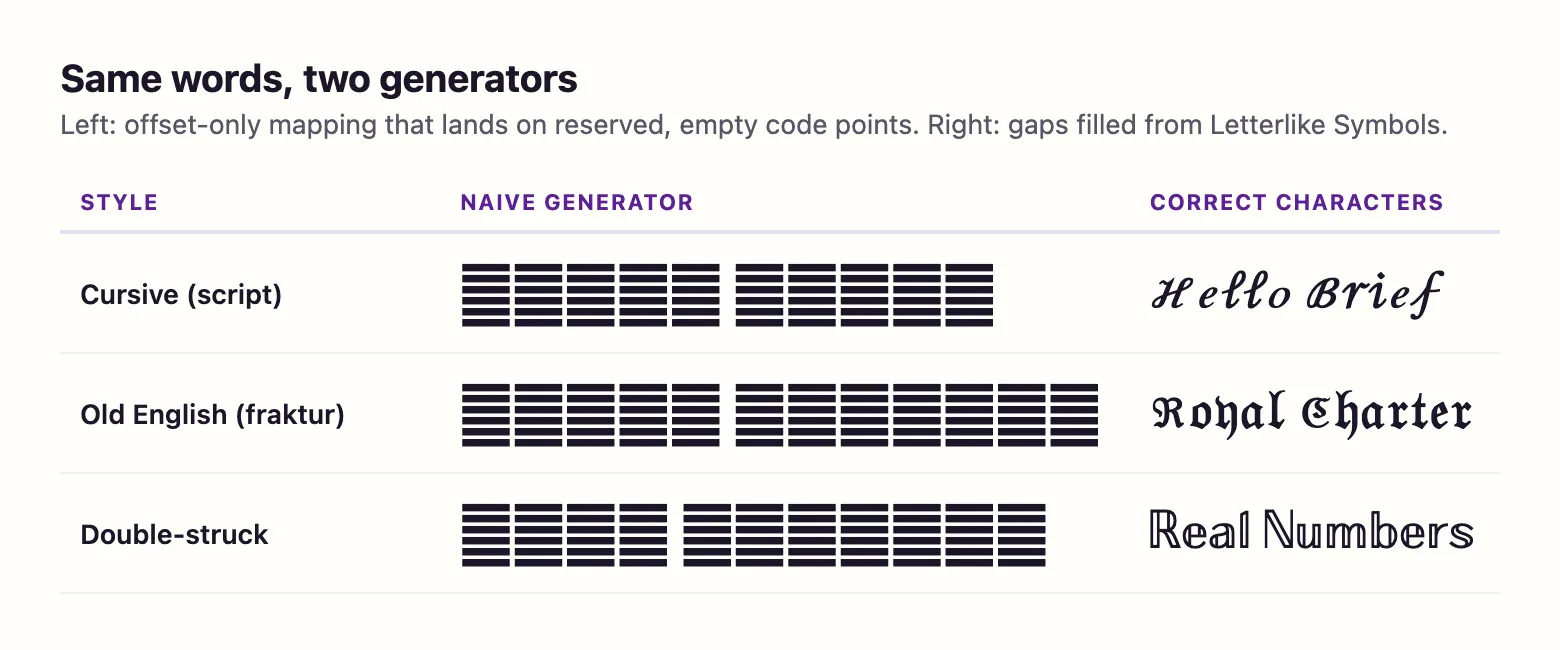
A generator that simply adds a fixed offset to every letter lands on these holes. Type “Hello” into one and the H comes out as a box in script, fraktur and double-struck alike, while the other letters look fine. This site's engine maps each hole to its Letterlike character instead.
| Letter | Empty slot a naive generator uses | Drawn there? | Correct character |
|---|---|---|---|
| C | U+1D53A (reserved, unassigned) | No — box on macOS and Android | ℂ U+2102 |
| H | U+1D53F (reserved, unassigned) | No — box on macOS and Android | ℍ U+210D |
| N | U+1D545 (reserved, unassigned) | No — box on macOS and Android | ℕ U+2115 |
| P | U+1D547 (reserved, unassigned) | No — box on macOS and Android | ℙ U+2119 |
| Q | U+1D548 (reserved, unassigned) | No — box on macOS and Android | ℚ U+211A |
| R | U+1D549 (reserved, unassigned) | No — box on macOS and Android | ℝ U+211D |
| Z | U+1D551 (reserved, unassigned) | No — box on macOS and Android | ℤ U+2124 |
Finding 3: five characters turn into emoji
Not every surprise is a box. Some characters exist in both a text form and an emoji form, and the system may pick the color emoji font to draw them. In our measurement five fancy-text characters are in both Apple Color Emoji and Noto Color Emoji: Ⓜ (U+24C2, from the bubble style) and 🅰 🅱 🅾 🅿 (U+1F170, U+1F171, U+1F17E, U+1F17F, from the filled squared style).
The effect is a word where one or two letters are suddenly bigger, colored badges: Ⓦⓔⓛⓒⓞⓜⓔ is fine, but Ⓜⓐⓡⓚ may start with an emoji M. It is not a box and nothing is broken; it is simply a different drawing. If it spoils the look, use a style that avoids those letters, or the outlined squared style, whose letters are not in either emoji font.
Cause #1: a generator that used reserved code points
We put this first because it is the only cause our font test shows failing on current Apple and Android systems. That is a ranking by mechanism, not by frequency: we measured fonts, not generators, so we can't say how many generators emit these slots. What we did show is that the 24 reserved slots are drawn by no font we tested, and that mapping letters by a fixed offset lands on them, as the screenshot at the top of this page shows. Text containing them shows boxes even on a brand-new phone, for everyone who sees it.
It has a fingerprint: the boxes appear only on particular letters. In cursive, watch B E F H I L M R and e g o. In Old English, C H I R Z. In double-struck, C H N P Q R Z. In italic, a lone h. If “𝒮𝓉𝒶𝓇” looks fine but a name with an R in it gets a box exactly where the R should be, this is your cause.
The fix is to regenerate the text with a tool that uses the Letterlike characters. Pasting the old text into a different app will not help, because the characters themselves are empty slots.
| Style | Letters with a reserved slot | Use instead |
|---|---|---|
| Script (cursive) | B E F H I L M R e g o | ℬ ℰ ℱ ℋ ℐ ℒ ℳ ℛ ℯ ℊ ℴ |
| Fraktur (Old English) | C H I R Z | ℭ ℌ ℑ ℜ ℨ |
| Double-struck | C H N P Q R Z | ℂ ℍ ℕ ℙ ℚ ℝ ℤ |
| Italic | h | ℎ |
Cause #2: older systems and apps that bring their own fonts
Fonts are updated along with the operating system. A device on an older version has older fonts, and a character that today's fonts draw may be missing from them. We measured only current systems, and on Android only the stock AOSP/Google fonts; phone makers such as Samsung ship their own fonts, which we did not test. So we can't say which older versions or brands lack which characters; what we can say is the mechanism. If text looks right on your new phone and shows boxes on a friend's older one, the difference is the fonts installed on their device.
Apps can cause the same thing on a current system. Most apps draw text with the system's fonts and let the system fall back through every installed font when a character is missing. Some, often games and apps built on their own rendering engines, ship a limited font of their own and don't fall back. Inside such an app, a character the phone could draw elsewhere may still come out as a box.
We have not tested individual apps, so we don't name any here. The test is simple: paste the same text into the device's notes app. If it shows there and not in the other app, the app is the cause; if it fails in both, the device's fonts are.
The same applies to the person reading your text, not just to you. A bio or display name is drawn on each viewer's device with that device's fonts, so one friend may see boxes while you and everyone else see the style. Asking what device and app they are using usually settles it in one message.
Cause #3: Windows, which our test did not cover
Windows uses its own set of fonts for these characters, such as Segoe UI Symbol and Cambria Math, and those fonts were not on the machine we measured. We therefore make no claim, either way, about how fancy text looks on Windows.
If you or your readers see boxes on a Windows PC, the general rule still applies: the box means no font Windows could find has that character. The same app-versus-system test from cause #2 works there too: try the text in a browser or a plain text editor on the same computer.
Cause #4: fields that strip combining marks
Strikethrough, underline, slashed and glitch text work differently from the letter styles. They keep your plain letters and add a combining mark after each one: U+0336 for a strike line, U+0332 for an underline, U+0338 for a slash, and assorted marks from U+0300–036F for glitch. The mark has no width of its own; it is drawn on top of the letter before it.
Our measurement found those marks drawn on both platforms. The failure here is usually not a box at all. Some text fields clean up input and remove characters they don't expect, and if a field drops the marks you are left with ordinary letters, so “s̶t̶r̶i̶k̶e̶” arrives as “strike”. Fields with tight character limits can also refuse the text, because each styled letter is now two characters.
If a strikethrough or glitch effect disappears, the field is the cause, not your device. Use the app's own formatting where it has one.
To confirm it, copy the text back out of the field after saving and paste it into a notes app. If the marks are gone there too, the field removed them when you saved; if they reappear, the field only failed to draw them.
Fancy text showing as boxes, plain letters or emoji: which cause is it?
What you see narrows it down quickly. Match the symptom, then check the cause it points to.
| What you see | Most likely cause | First thing to try |
|---|---|---|
| Boxes on a few specific letters (cursive R, double-struck C, italic h) | Reserved code points in the text | Regenerate the text with a tool that uses Letterlike characters |
| Every styled letter is a box, on one device only | Older system fonts on that device | Update the system, or use bold or a simpler style |
| Boxes in one app, fine in the notes app | The app uses its own limited font | Use plain text or the app's own formatting there |
| Boxes on a Windows PC | Not covered by our test | Try the text in a browser on the same PC |
| The line or glitch marks vanished | The field strips combining marks | Use the app's own strikethrough or underline |
| One letter became a color badge | Emoji form of Ⓜ 🅰 🅱 🅾 🅿 | Pick a style without those letters |
Fixes, in the order to try them
Work through these from the top when you find fancy text showing as boxes. The first two deal with the cause our font test shows failing on current systems, and they cost nothing.
If you publish styled text where many people will see it, such as a profile, a server name or a social post, check it on at least one other device before you rely on it, ideally one running a different operating system from yours.
- Regenerate the text here. If the old text came from another site, its script, fraktur, double-struck or italic letters may sit in reserved slots. Type the plain words again and copy a fresh version.
- Check the same text in the device's notes app. Fine there means the app is the cause; boxes there mean the device's fonts are.
- Update the operating system if the device is behind. Newer fonts may include characters older ones lack.
- Switch to a style with simpler characters. Bold and bold sans have every letter and digit in one block with no holes, and they were drawn completely on both platforms we measured.
- Avoid styles where the effect matters most in fields that clean input. Strikethrough and glitch depend on combining marks a field may remove.
- For anything people must read, such as a username, a rule or contact details, use plain text. Styled letters are symbols to screen readers too, which W3C's guidance on separating meaning from presentation is about.
Sources & further reading
- Unicode — Mathematical Alphanumeric Symbols chart (U+1D400–1D7FF)
- Unicode — Letterlike Symbols chart (U+2100–214F)
- Unicode Standard, latest version (ch. 22, Symbols)
- Android Open Source Project — platform fonts.xml
- Unicode — Combining Diacritical Marks chart
- W3C — Understanding WCAG 2.2: Info and Relationships
Read next
- Cursive Font Generator
Cursive font generator with thin and bold Unicode script. See the 11 letters borrowed from an older block, why numbers stay plain, and measured coverage.
- Old English Font Generator
Old English font generator for blackletter-style text: regular and bold fraktur, the five capitals Unicode borrows from an older block, and every letter mapped.
- Copy and Paste Fonts
Copy and paste fonts in 27 Unicode styles: bold, cursive, Old English and more. See which letters each style lacks and which phones can draw them.
- Bold Text Generator
Bold text generator with six Unicode bold styles, serif to fraktur. See which ones have bold digits, every character mapped, and measured phone coverage.
- Weird Text Generator
Weird text generator with nine styles: glitch, upside down, bubble, crossed out and wide letters, plus which Unicode characters each one is built from.
Part of Copy and Paste Fonts. Want every style at once? Use the fancy text generator on the home page.

Sukie · Editor
Sukie edits Fancy Text Styles. Every style on the site is checked against the Unicode Consortium code charts before it is published, and every page names the characters a style cannot produce instead of hiding them.
About this site · How pages are checked · Last updated October 27, 2026
Fancy Text Styles is an independent site. Discord, Instagram, TikTok, X and other platform names belong to their owners and are used only to describe where text is pasted; none of them endorse this site.