
Discord Text Formatting: Cheat Sheet and Formatter
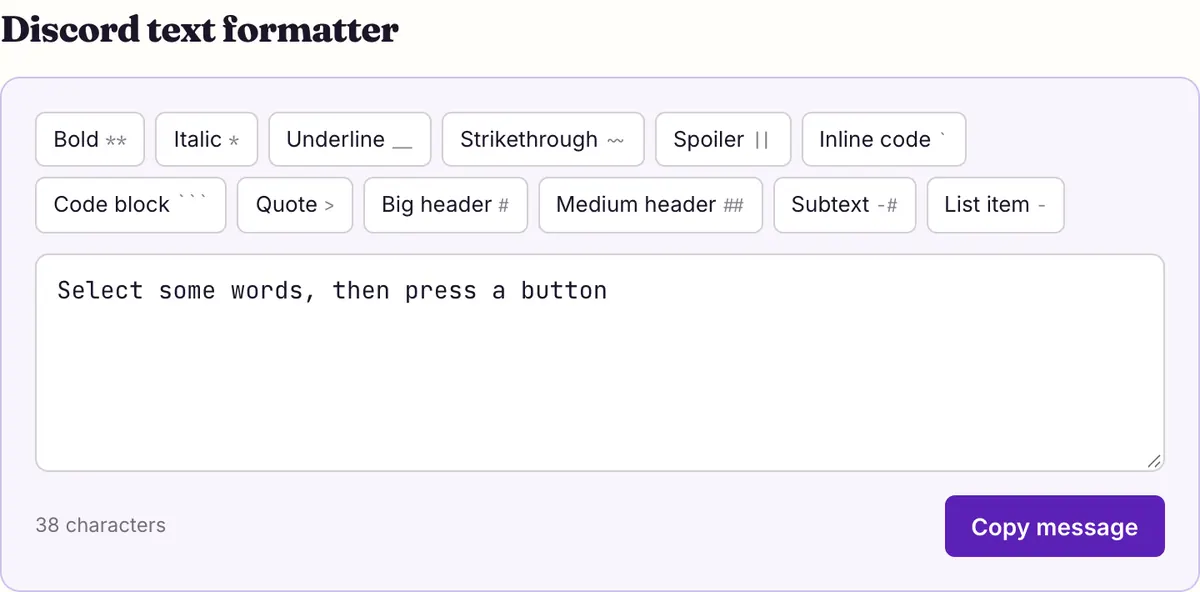
Discord text formatting is markdown: wrap words in symbols and Discord draws the style. **bold**, *italic* (or _italic_), __underline__, ~~strikethrough~~ and ||spoiler|| work inline; # header, -# subtext, - list and > quote go at the start of a line. Select text in the formatter, press a button, and copy the message.
Discord text formatter
Every rule of Discord text formatting on this page comes from two official help articles, Markdown Text 101 and Spoiler Tags, both read on 2026-10-27. The cheat sheet comes first; the sections after it cover the parts people get wrong: stacking styles, line-start rules, and what code blocks switch off.
Where Discord's articles say nothing (escaping symbols, color, fonts), this page says so instead of repeating forum folklore.
Discord text formatting cheat sheet
Discord text formatting comes in two kinds. Inline styles wrap the words they change. Line styles go at the very start of a line, followed by a space. Type the symbols exactly as shown; Discord converts them when you send.
| Effect | Type this | Where it goes |
|---|---|---|
| Italic | *italics* or _italics_ | Inline |
| Bold | **bold** | Inline |
| Bold italic | ***bold italics*** | Inline |
| Underline | __underline__ | Inline |
| Strikethrough | ~~Strikethrough~~ | Inline |
| Spoiler | ||spoiler|| | Inline, or a whole message |
| Inline code | `code` | Inline |
| Code block | ``` on the lines before and after | Own lines |
| Big header | # Header | Start of a line |
| Smaller header | ## Header | Start of a line |
| Even smaller header | ### Header | Start of a line |
| Subtext | -# small grey line | Start of a line |
| Bulleted list | - item or * item | Start of each line |
| Indented list item | two spaces, then - item | Start of a line |
| Masked link | [text shown](https://example.com) | Inline |
| Quote (one line) | > text | Start of a line |
| Quote (rest of message) | >>> text | Start of the first quoted line |
Stacking styles: the combinations Discord shows
Styles can be layered by nesting their symbols. Markdown Text 101 lists four combinations, and all four follow the same pattern: the underline marks go on the outside, the asterisks on the inside.
Bold italic is its own three-asterisk form rather than a nesting of two. Other orders, and combinations with strikethrough or spoilers, are not shown in the article. They may work, but test them in a message before you build a server announcement around them.
When a combination comes out wrong, check that the closing symbols mirror the opening ones. In __**underline bold**__ the text opens with underscores then asterisks, so it must close with asterisks then underscores. A missing or extra character anywhere in that chain usually leaves the symbols showing in the sent message.
- One underscore on each side (_word_) is italic; two (__word__) is underline. Easy to mix up when typing fast.
- Three asterisks give bold italics; two give bold; one gives italics. Count them on both sides.
- Headers, subtext, lists and quotes need a space after their symbol: “# ”, “-# ”, “- ”, “> ”.
- Line styles only work at the start of a line; inline styles work anywhere in a sentence.
- Anything inside backticks is shown as typed, spoilers included.
| Result | Type this |
|---|---|
| Underline italics | __*underline italics*__ |
| Underline bold | __**underline bold**__ |
| Underline bold italics | __***underline bold italics***__ |
| Bold italics | ***bold italics*** |
Headers and subtext only work at the start of a line
A header is one, two or three # characters at the beginning of a new line: # for a big header, ## for a smaller one, ### for an even smaller one. Discord's article repeats the one rule that trips people up: put a space between the # characters and your text. “#Rules” stays plain; “# Rules” becomes a header.
Subtext works the same way with -# followed by a space, and Discord stresses that it “must be at the very beginning of the line in order for it to work”. A -# in the middle of a sentence is just two characters. Subtext is useful for a small credit or footnote under an announcement.
In a multi-line message, each line is judged on its own. You can put a header on line one, normal text on line two and subtext on line three.
One message, three line styles
# Game night is Friday
Bring snacks and a working mic.
-# posted by the events team
Lists, quotes and masked links
Start each line with - or * and a space to make a bulleted list. To indent an item under the one above it, add two spaces before the - or *. The article's note on spacing also lists “1.” among list markers, so numbered lines work the same way: number, period, space, text.
Quotes come in two sizes. A > and a space at the start of a line quotes that single line. Three of them, >>> and a space, quote the first line and everything after it in the same message, which is handy for pasting a long passage.
A masked link shows your own words as a clickable link. Put the text in square brackets and the address in parentheses straight after it, with no space between them: the rules.
A list with an indented item, then a quote
- Read the rules channel
- Pick your roles
  - Members pick up to three
> Questions go to the help channel
Code blocks switch formatting off
Wrap text in single backticks for inline code, or put ``` on the line before and the line after for a multi-line block. Discord shows the content in a fixed-width font on a darker background, which makes it the right tool for commands, server IPs and anything people need to copy exactly.
Because the content is shown as typed, a code block is also the safe place for text full of asterisks or underscores, such as file names like my_file_name or a math expression with * signs, which markdown might otherwise turn into italics.
Code blocks also cancel other formatting. Discord documents this for spoilers in both articles: a spoiler inside a code block is not hidden. If you are posting a puzzle answer, keep the || outside any backticks.
The same fence is what the community uses for colored text: a code block tagged ansi, filled with escape codes. Discord has not documented that, which is why it gets its own page with its own caveats.
A multi-line code block
```
Server IP: play.example.net
Port: 25565
```Spoiler tags beyond the double bars
Typing ||text|| is one of four ways to hide something. The Spoiler Tags article lists the others, and a few limits worth knowing before you rely on them.
- Desktop: highlight the text in the message box and click the eye icon.
- Any platform: type /spoiler before your message to hide all of it.
- iOS: select the text, tap it to open the menu, then tap Mark as Spoiler.
- Images, videos and files: click the eye icon on the attachment before sending.
- Links: put || on both sides of the URL. Server invite embeds cannot be hidden this way.
- Readers can choose to show spoilers on click, always, or on servers they moderate, under User Settings > Text & Images; Discord says that setting exists only on desktop and browser.
- Leaving the channel re-hides spoilers you have already opened.
How do you show the symbols themselves?
Sometimes you want people to see **bold** with the asterisks, for instance when explaining formatting to a new member. Discord's Markdown Text 101 article does not document an escape character for this, and we have not tested one, so this page does not tell you that a backslash works.
What the article does give you is the code span. Text inside backticks is shown as typed, which is how the cheat sheet above would be written in a Discord message. For a whole block of examples, use a ``` code block.
If an undocumented trick you have seen elsewhere works for you, it may still change without notice. The code span is the documented route.
Color, size and fonts: what markdown can't do
Discord text formatting has no color syntax and no font choice. Its shortcuts guide says it plainly: Discord “doesn't have built-in font commands”. The only size control is the three header levels and subtext.
Each missing piece has a workaround with its own trade-off. Color comes from ```ansi code blocks, which are community-documented and unreliable on phones. A different letter shape comes from pasting Unicode characters such as 𝓼𝓬𝓻𝓲𝓹𝓽 or 𝕺𝖑𝖉 𝕰𝖓𝖌𝖑𝖎𝖘𝖍, covered on the Discord fonts page. For your name only, Nitro's Display Name Styles adds Discord's own fonts and effects.
| You want | Markdown | Alternative | Catch |
|---|---|---|---|
| Colored words | No | ```ansi code block | Not documented by Discord; community-reported as unreadable on mobile |
| A different font | No | Unicode styles | They are symbols, not letters, for screen readers |
| Bigger text | Headers #, ##, ### | None needed | Start of a line only |
| Smaller text | Subtext -# | Unicode small caps or superscript | Gaps: superscript q exists but isn’t drawn on Apple or Android, so it stays plain |
| A styled name | No | Nitro Display Name Styles, or Unicode in the display name | Nitro is paid; usernames accept neither |
Keyboard shortcuts and the message limit
On desktop you don't have to type the symbols. Discord's shortcuts guide lists Ctrl+B for bold, Ctrl+I for italic and Ctrl+U for underline (⌘ on a Mac), plus Ctrl+Shift+M to start or stop inline code. Select the words first, then press the keys.
A message can be 2,000 characters, or 4,000 with Nitro, according to Discord's account caps table. The formatter above counts everything you type, symbols included, against 2,000 so a formatted message won't be cut short. Discord does not say whether it counts the symbols, so the margin is deliberate.
One accessibility point: markdown bold and italic keep the real letters, so screen readers read the words normally. If you are choosing between **bold** and a Unicode 𝐛𝐨𝐥𝐝 for rules or announcements, markdown is the one everyone can read.
Questions people ask
- How do I make text bold on Discord?
- Put two asterisks on each side: **bold**. On desktop you can also select the words and press Ctrl+B (⌘+B on a Mac).
- Why didn't my header work?
- The # must be the first character of a new line and must be followed by a space. “# Title” works; “#Title” or “text # Title” stays plain.
- Can I underline and bold at the same time?
- Yes. Discord's article shows __**underline bold**__, with the underscores outside the asterisks. Add a third asterisk on each side for underline bold italics.
- Do spoilers work inside a code block?
- No. Discord says text marked as a spoiler inside a code block is not hidden. Keep the || outside the backticks.
- How do I make a quote cover several lines?
- Start the first line with >>> and a space. Everything after it in that message is quoted. A single > quotes only its own line.
- Is there a way to change text color with markdown?
- No. Discord's markdown has no color syntax. The community uses ```ansi code blocks with escape codes, which Discord has not documented; see the Discord colored text page for how and where it fails.
- How do I make text smaller on Discord?
- Start the line with -# and a space to make subtext. It must be at the very start of the line. For tiny letters inside a sentence, Unicode superscript or small caps are the only option.
- Does formatting work on the mobile app?
- The Spoiler Tags article confirms the same markdown syntax works on mobile for spoilers, and iOS adds a Mark as Spoiler menu item. Markdown Text 101 itself does not split its instructions by platform.
Sources & further reading
Read next
- Discord Colored Text
Discord colored text with ANSI code blocks: pick colors, copy the message, paste it. Includes the code chart, the mobile caveat and fixes for common failures.
- Discord Fonts
Discord fonts to copy and paste for display names, nicknames and messages, checked against Discord's own rules on which fields accept Unicode letters.
- Strikethrough Text Generator
Strikethrough text generator that crosses out text with Unicode marks, plus when to use Discord’s ~~ or your editor’s own strikethrough instead.
- Blank Space Copy and Paste
Blank space copy and paste: Hangul Filler, Braille Blank, zero width space and three wide spaces, with code points and which one to try for names or messages.
Part of Discord Fonts. Want every style at once? Use the fancy text generator on the home page.

Sukie · Editor
Sukie edits Fancy Text Styles. Every style on the site is checked against the Unicode Consortium code charts before it is published, and every page names the characters a style cannot produce instead of hiding them.
About this site · How pages are checked · Last updated October 27, 2026
Fancy Text Styles is an independent site. Discord, Instagram, TikTok, X and other platform names belong to their owners and are used only to describe where text is pasted; none of them endorse this site.