Discord Fonts: Copy and Paste Styles, and Where Each One Can Go
Discord fonts are Unicode letters, not installable fonts: Discord has no font picker for messages, but it accepts characters such as 𝗕𝗼𝗹𝗱 or 𝓢𝓬𝓻𝓲𝓹𝓽 pasted from a generator. Discord's help center says display names can include special characters; usernames cannot (a–z, 0–9, _ and . only). Type in the box, copy a style, paste it.
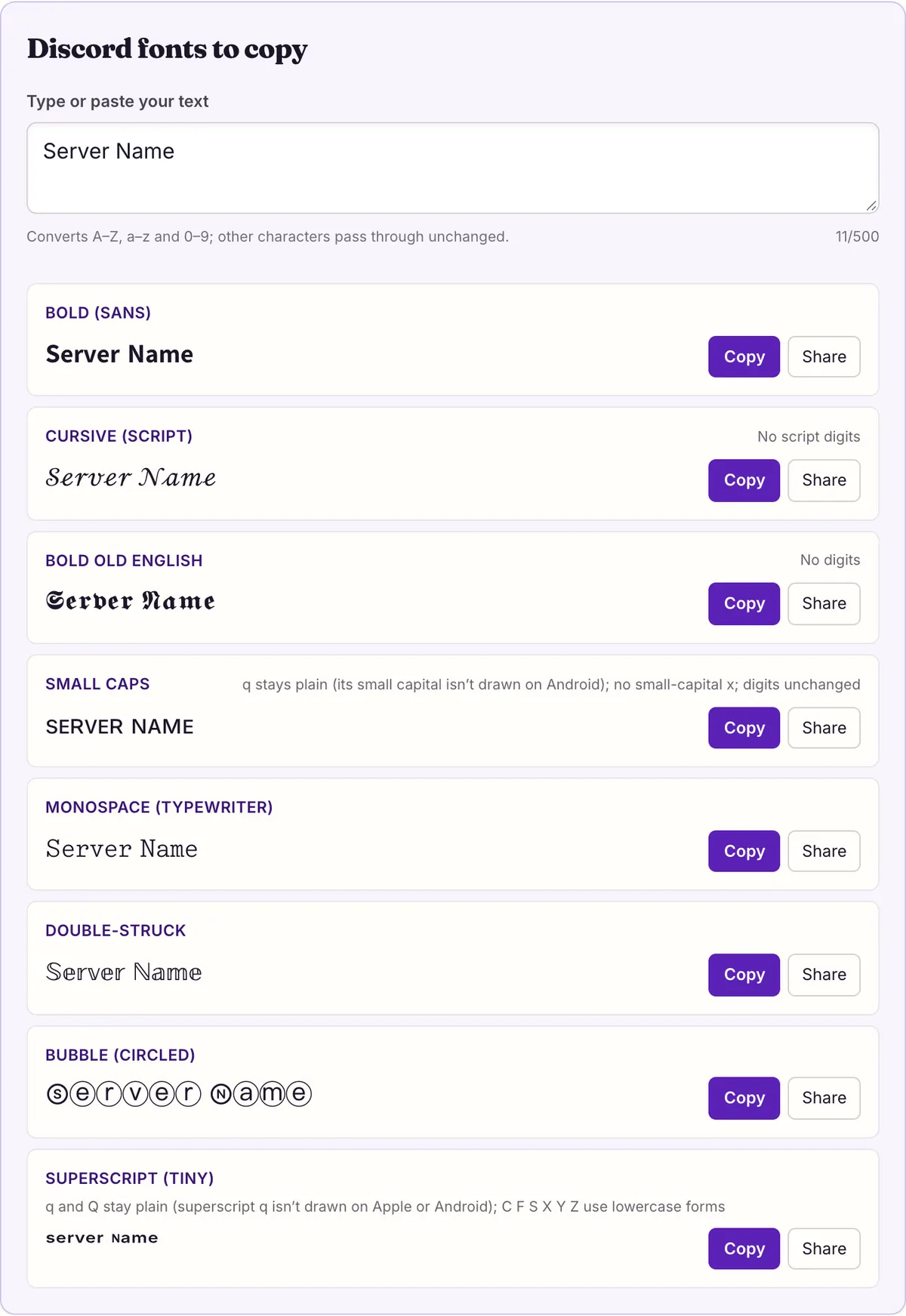
Discord fonts to copy
No script digits
No digits
q stays plain (its small capital isn’t drawn on Android); no small-capital x; digits unchanged
Monospace (typewriter)
Double-struck
q and Q stay plain (superscript q isn’t drawn on Apple or Android); C F S X Y Z use lowercase forms
Where can Discord fonts actually go? Most generators skip that question. They show you forty styles and say “paste anywhere”, but Discord has several name fields with different rules, and only some of them accept anything beyond plain letters.
This page answers it field by field from Discord's own help articles, read on 2026-10-27, and says plainly where those articles are silent. The eight styles in the tool above were picked for names: short, readable, and drawn completely by the system fonts of macOS 26.5.1 and Android in our own font measurement. The rest of the site's 27 styles are one click away.
Which Discord fields accept fancy text?
Two fields are settled by Discord's help center: your username rejects fancy characters and your display name accepts them. Messages accept them too, because a message is ordinary text. For server nicknames, server names and channel names, Discord explains how to set them but publishes no list of allowed characters, so the table says “not documented” rather than guessing.
The practical rule that follows: put the styled version of your name in the display name, keep the username plain, and test anything else by pasting it in and pressing Save. If the field refuses the text or quietly changes it, you have your answer for that field.
| Field | Fancy Unicode? | What Discord's help center says | Length |
|---|---|---|---|
| Username | No | Latin a–z, numbers 0–9, underscore and period only; forced lowercase; no two periods in a row | 2–32 characters |
| Display name | Yes | “Can be almost anything… including special characters, spaces, and emojis” | 1–32 characters |
| Server nickname | Not documented | Explains the Change Nickname permission and the /nick command; lists no character rules | Not stated |
| Server name | Not documented | You enter a name when creating the server and can change it later; no character rules | Not stated |
| Channel name | Not documented | Edit a channel from the cogwheel next to its name if you have permission; no character rules | Not stated |
| Message | Yes | Formatting comes from markdown; Discord has no built-in font commands | 2,000 characters (4,000 with Nitro) |
Username vs display name: the rule behind most failed pastes
Since Discord dropped the old #0000 tags, every account has two names. The username is the unique handle people use to add you as a friend. Discord's FAQ answers the fancy-character question directly: new usernames are “restricted to only Latin, alphanumeric characters and select special characters ( _ and . )”. A script 𝓼𝓪𝓶 or a bold 𝘀𝗮𝗺 will not save there, and neither will capitals, because usernames are forced to lowercase.
The display name is the one people actually see. Discord calls it your most prominent identity: it is the name shown on your messages in DMs, and in servers where you have no server nickname. It can be 1 to 32 characters, it allows “uppercase, lowercase, and non-Latin characters”, and you can change it “even from one minute to the next”. Usernames, by contrast, can be changed only twice a week, which is another reason to keep the experimenting in the display name.
So when a generator promises a “Discord username font”, read it as a display-name font. On Discord, the handle stays plain.
Nicknames, server names and channel names: what the help pages leave out
A server nickname replaces your display name inside one server. Discord's Server Nicknames article covers the mechanics: you need a role with the Change Nickname permission, moderators with Manage Nickname can change yours, and you can set it from Edit Per-server Profile or by typing /nick followed by the new name. It does not say which characters a nickname may contain.
Server names and channel names are in the same position. The server-creation article says you type a name when you create the server and can update it later. The text-channel article says you edit a channel from the cogwheel beside its name, if you have permission. Neither article lists allowed characters or a length.
We have not tested these fields ourselves, so this page does not claim they accept or reject Unicode styles. The honest way to find out takes ten seconds: paste the styled text into the field, save, and look at the result in the channel list or member list. If you run a server, try it on a test channel first so members don't see five renames in a row.
- Copy a style from the tool above (𝗦𝗲𝗿𝘃𝗲𝗿 𝗡𝗮𝗺𝗲 in bold sans is a good first test).
- Open the field: Edit Per-server Profile for a nickname, Server Settings for the server name, the cogwheel for a channel.
- Paste, save, then check the result where other people will see it, not only in the settings box.
- If letters come back plain, changed or refused, use that field for plain text and keep the style for your display name.
Discord fonts in messages, next to markdown
Messages are where Unicode styles and Discord's own formatting overlap, and it helps to know which does what. Discord's formatting is markdown: you wrap words in symbols and the app draws them in bold, italic, underline or strikethrough, or turns a line into a header or subtext. Discord's own shortcuts guide is direct about the limit, in the line quoted at the end of this section.
Markdown therefore covers emphasis. Unicode covers the looks markdown cannot make: 𝓬𝓾𝓻𝓼𝓲𝓿𝓮, 𝕺𝖑𝖉 𝕰𝖓𝖌𝖑𝖎𝖘𝖍, 𝕕𝕠𝕦𝕓𝕝𝕖-𝕤𝕥𝕣𝕦𝕔𝕜, ⓑⓤⓑⓑⓛⓔ, ꜱᴍᴀʟʟ ᴄᴀᴘꜱ or ˢᵘᵖᵉʳˢᶜʳⁱᵖᵗ. When both would work, prefer markdown for bold and italic in messages. Markdown keeps the real letters, so the words stay ordinary text for anyone using a screen reader; a Unicode bold word is a run of mathematical symbols.
Full syntax, combinations and spoilers are on the Discord text formatting page. If you want color, that comes from a community-documented code-block trick covered on the Discord colored text page; Discord's markdown has no color option.
While Discord doesn't have built-in font commands, you can customize your message formatting using these markdown options.
— Discord Help Center, Discord Commands, Shortcuts, and Navigation Guide (read 2026-10-27)
Nitro Display Name Styles is a separate, paid feature
Discord now sells its own name fonts. Display Name Styles is a Nitro feature that changes how your display name is drawn: a font, an effect and a color. Discord's FAQ lists the fonts (gg sans, Tempo, Sakura, Jellybean, Modern, Medieval, 8Bit, Vampyre, Monkey Bars, Mainframe, Headbang and Journal) and the effects (Solid, Gradient, Neon, Toon, Pop, Gummy and Prism). Anyone can preview them; only Nitro members can save one.
This is a different mechanism from everything else on this site. A Nitro style is a setting Discord applies when it draws your name; the letters underneath stay plain. A Unicode style is the letters themselves: 𝓢𝓪𝓶 is four different characters from Sam, so it looks the same whether or not you pay for anything.
| Feature | Nitro Display Name Styles | Unicode styles from this page |
|---|---|---|
| Cost | Requires Nitro to save | Free; it is just text |
| Where it applies | Display name and per-server profiles | Any field that accepts the characters |
| In servers | Only the font shows; role color replaces the style color | The characters show as typed |
| Odd symbols | Some symbols fall back to gg sans | Shown with whatever font has the character |
| Viewer can switch it off | Yes, under Accessibility settings | No setting for this is documented |
| Changes the actual letters | No | Yes |
Eight styles that fit a 32-character name
Display names cap at 32 characters, so the useful styles are compact and complete. These are the eight Discord fonts in the tool above, shown with the text “Server Name” and the gaps each one has in Unicode. A gap means the character does not exist, so the generator leaves the plain letter in place; it is not a display fault.
Discord's help pages do not say how the 32-character limit counts these letters. Most of them sit outside Unicode's basic range and take more storage than a plain letter, and the strikethrough and glitch styles add an extra mark to every letter. If a styled name is refused as too long while the plain version fits, that is the likely reason; shorten it or pick a style without combining marks.
| Style | “Server Name” | Gaps |
|---|---|---|
| Bold (sans) | 𝗦𝗲𝗿𝘃𝗲𝗿 𝗡𝗮𝗺𝗲 | None; digits included (𝟮𝟬𝟮𝟲) |
| Cursive (script) | 𝒮ℯ𝓇𝓋ℯ𝓇 𝒩𝒶𝓂ℯ | No digits; 11 letters come from Letterlike Symbols (ℯ above) |
| Bold Old English | 𝕾𝖊𝖗𝖛𝖊𝖗 𝕹𝖆𝖒𝖊 | No digits |
| Small caps | ꜱᴇʀᴠᴇʀ ɴᴀᴍᴇ | q stays plain (its small capital isn’t drawn on Android); no small-capital x; digits unchanged |
| Monospace | 𝚂𝚎𝚛𝚟𝚎𝚛 𝙽𝚊𝚖𝚎 | None; digits included |
| Double-struck | 𝕊𝕖𝕣𝕧𝕖𝕣 ℕ𝕒𝕞𝕖 | None; 7 capitals come from Letterlike Symbols (ℕ above) |
| Bubble (circled) | Ⓢⓔⓡⓥⓔⓡ Ⓝⓐⓜⓔ | None, but Ⓜ is drawn as a color emoji on Apple and Android |
| Superscript | ˢᵉʳᵛᵉʳ ᴺᵃᵐᵉ | q and Q stay plain (superscript q isn’t drawn on Apple or Android); C F S X Y Z use lowercase forms |
Keep people able to find and mention you
A styled name is made of different characters, so typing a plain “sam” does not literally match 𝓼𝓪𝓶. Anyone who tries to @mention you by typing the name they see may not find you, because the letters on their keyboard are not the letters in your name.
Discord gives you two ways around it. The Server Nicknames article says you can @mention someone by either their username or their nickname, and your username is always plain. On desktop, Discord's Mention Suggestions feature (an experiment shown to some users) searches usernames, display names, server nicknames and friend nicknames. Keeping your username recognizable, and leaving at least one plain word in a styled display name, keeps you easy to find.
Boxes, emoji and other surprises on someone else's screen
Your name is drawn on each viewer's device with whatever fonts that device has, so it can look different for other people. We measured this for the site's 27 styles on 2026-10-27: every character they produce is drawn by at least one system font on macOS 26.5.1 (365 font files) and on Android's system fonts. Windows was not part of the test, so we make no claim about it.
Two results matter for Discord names. First, Ⓜ and the filled squared 🅰 🅱 🅾 🅿 are drawn as color emoji on both platforms, which can look out of place in the middle of a word. Second, 24 code points inside the math-letter block are reserved and drawn by no font at all; generators that use them for letters like cursive B or double-struck R produce boxes. This site's engine uses the correct Letterlike characters (ℬ, ℝ) instead. The full measurement is on the fancy text showing as boxes page.
Every page in this section
- Discord Colored Text
Discord colored text with ANSI code blocks: pick colors, copy the message, paste it. Includes the code chart, the mobile caveat and fixes for common failures.
- Discord Text Formatting
Discord text formatting cheat sheet from Discord's own help articles: bold, italic, underline, headers, subtext, lists, quotes, code and spoilers.
Questions people ask
- Can I change the font of my Discord messages?
- Not with a setting. Discord's help center says it has no built-in font commands; messages are formatted with markdown (bold, italic, underline, strikethrough, headers). To get a different look you paste Unicode characters such as 𝓼𝓬𝓻𝓲𝓹𝓽 or 𝕺𝖑𝖉 𝕰𝖓𝖌𝖑𝖎𝖘𝖍, which are text, not a font.
- Can I use a fancy font in my Discord username?
- No. Discord's FAQ says new usernames are restricted to Latin letters a–z, numbers 0–9, underscore and period, are forced lowercase and must be 2–32 characters. Put the styled version in your display name instead.
- Does a fancy display name work without Nitro?
- Yes. Unicode letters are ordinary characters, and Discord says display names can include special characters, spaces and emoji. Nitro is only needed for Discord's own Display Name Styles feature, which is a separate thing.
- How long can a styled display name be?
- Discord allows 1 to 32 characters. It does not document how characters outside the basic range are counted, so if a styled name is refused as too long, shorten it or switch to a style without combining marks.
- Can I put fancy text in a channel name?
- Discord's help pages don't say which characters channel names accept, and we haven't tested it. Paste the text in the channel's settings, save, and check how it looks in the channel list.
- Why can't people @mention me after I changed my name?
- A styled name is made of different characters from the plain letters people type. Discord says you can be mentioned by username or nickname, so tell people your plain username, or keep one plain word in your display name.
- Why does part of my name show as boxes for a friend?
- Their device has no font that draws one of the characters, or the generator you used put letters in reserved code points that no font draws. Copy the name again from this site and ask what device they are on.
- Why did the M in my bubble name turn into an icon?
- Ⓜ (U+24C2) is also an emoji. In our measurement, both Apple Color Emoji and Noto Color Emoji draw it, so many devices show a colored badge. Use a different style if that bothers you.
- Are these real fonts I can install for Discord?
- No. Nothing is installed. Each style swaps your letters for different Unicode characters, so they can be pasted into any field that accepts them and they look the same without any download.
- Can other people turn off my fancy name?
- Discord lets viewers turn off Nitro Display Name Styles in Accessibility settings. It documents no setting that converts Unicode letters back to plain ones, because those characters are part of the name itself.
Sources & further reading
- Discord Help Center — New Usernames & Display Names
- Discord Help Center — Display Name Styles FAQ
- Discord Help Center — Server Nicknames
- Discord Help Center — Discord Commands, Shortcuts, and Navigation Guide
- Unicode — Mathematical Alphanumeric Symbols chart
- W3C — Understanding WCAG 2.2: Info and Relationships
Read next
- Discord Text Formatting
Discord text formatting cheat sheet from Discord's own help articles: bold, italic, underline, headers, subtext, lists, quotes, code and spoilers.
- Discord Colored Text
Discord colored text with ANSI code blocks: pick colors, copy the message, paste it. Includes the code chart, the mobile caveat and fixes for common failures.
- Blank Space Copy and Paste
Blank space copy and paste: Hangul Filler, Braille Blank, zero width space and three wide spaces, with code points and which one to try for names or messages.
- Small Text Generator
Small text generator for small caps, superscript and subscript, with the exact letters each one is missing and how they display on macOS and Android.
- Glitch Text Generator
Glitch text generator for zalgo, cursed and creepy text. See how combining marks stack above, through and below letters, why they spill, and how to strip them.
Want every style at once? Use the fancy text generator on the home page.
Sukie · Editor
Sukie edits Fancy Text Styles. Every style on the site is checked against the Unicode Consortium code charts before it is published, and every page names the characters a style cannot produce instead of hiding them.
About this site · How pages are checked · Last updated October 27, 2026
Fancy Text Styles is an independent site. Discord, Instagram, TikTok, X and other platform names belong to their owners and are used only to describe where text is pasted; none of them endorse this site.