
Discord Colored Text Generator (ANSI Code Blocks)
Discord colored text works through a code block tagged ansi that contains invisible escape codes: 31 turns text red, 34 blue, 41 to 47 add backgrounds, 1 is bold and 4 underline. Shades vary with your Discord theme. Discord has never documented this, and it is community-reported as unreadable on mobile. Build the message above and copy it; typing the codes by hand won't work.
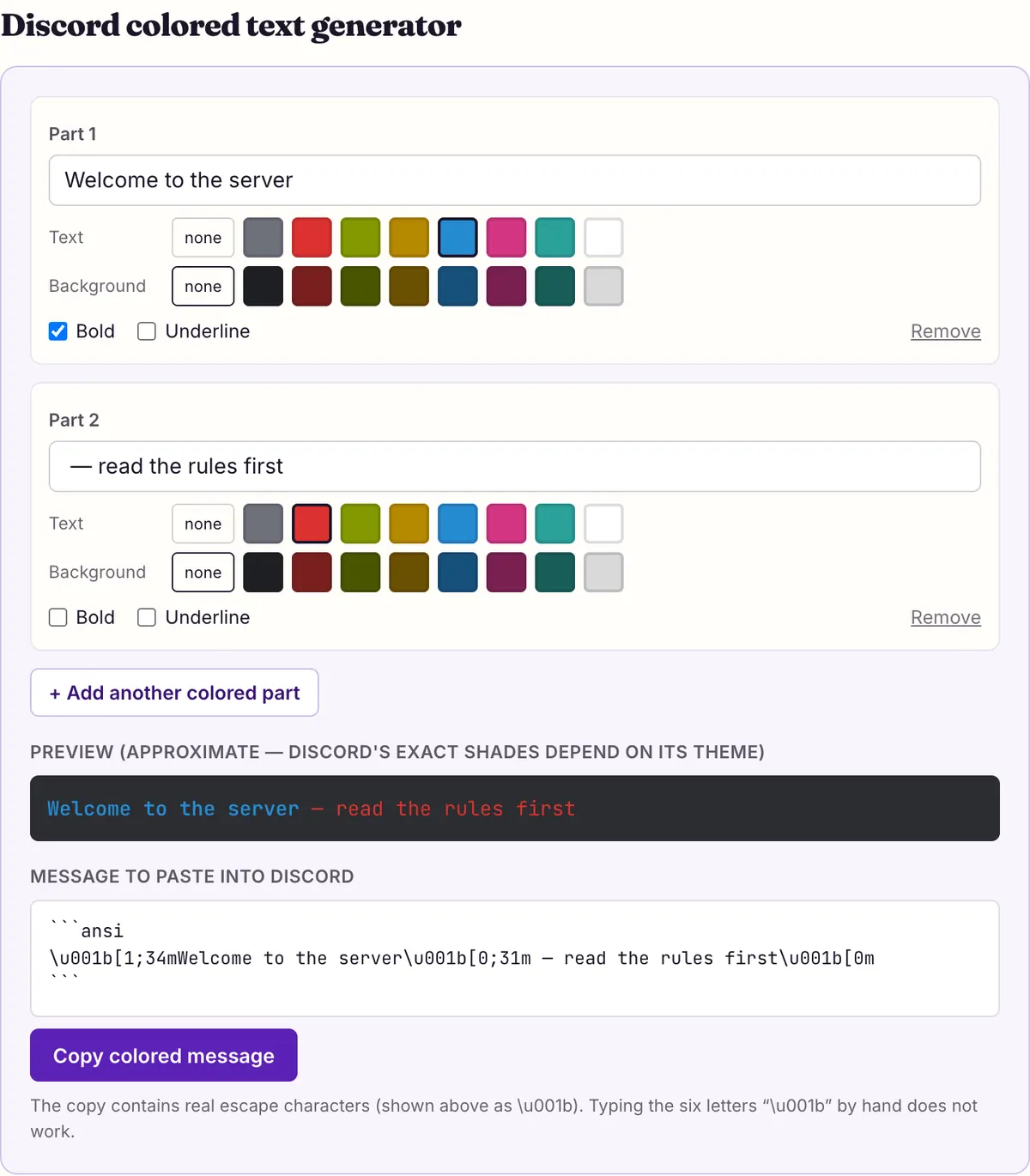
Discord colored text generator
- TextBackground
- TextBackground
Preview (approximate — Discord’s exact shades depend on its theme)
Message to paste into Discord
```ansi
\u001b[1;34mWelcome to the server\u001b[0;31m — read the rules first\u001b[0m
```
The copy contains real escape characters (shown above as \u001b). Typing the six letters “\u001b” by hand does not work.
Before you build any Discord colored text, know what you are relying on. Discord's markdown has no color option, and Discord's help center has no article about color at all: a search of it for “ansi” returned nothing on 2026-10-27. What people use instead is a side effect of code blocks, documented by the community, mainly in a widely shared GitHub guide.
That means it can look great on desktop, look wrong for friends on phones, and change whenever Discord updates its client. Use it for flavor, not for anything people must be able to read.
How the ansi code block produces color
ANSI escape codes are what terminals and consoles use to color text: an invisible ESC character, a bracket, some numbers and the letter m. Discord's desktop client applies those codes inside a code block whose language tag is ansi. Everything outside that block is ordinary text.
Each color change is a prefix in the form ESC[format;colorm. The community guide writes the ESC character as \u001b, which is how you type it in a bot's source code. In the message box it has to be the real, invisible character. That is the whole reason a generator exists: the tool above inserts the actual ESC character when you copy, while the six letters “\u001b” typed by hand do nothing.
A prefix stays in effect until the next one. To stop coloring, send ESC[0m, the reset code, before the plain text.
Using the tool takes four steps. Type each differently colored part of your message into its own box, pick a text color and, if you like, a background, then tick Bold or Underline. Add another part for the next color change. Press the “Copy colored message” button and paste the result into Discord as it is, without retyping any of it; the clipboard holds the full block, fences and invisible characters included.
If you write a bot instead, you don't need the tool. Most programming languages turn the six characters \u001b inside a normal string into the real escape character, which is why the community guide shows the codes that way. Send the string inside a ```ansi block exactly as you would any other code block.
What the copied message contains (ESC shown as \u001b)
```ansi
\u001b[1;34mWelcome to the server\u001b[0;31m — read the rules first\u001b[0m
```
ANSI code chart for Discord
These are the codes the community guide lists and the tool above builds. The names are the guide's own; it gives names, not exact shades, so the swatches in the tool's preview are an approximation of the desktop client rather than a measured palette. Exact shades also move: rebane2001's generator changelog records that Discord changed the color palette it uses for ANSI in August 2026, and that the shade you see depends on the Discord theme, Light, Ash, Dark or Onyx. Check the result in the theme most of your members use.
Text colors run from 30 to 37 and backgrounds from 40 to 47, in the same order: the last digit picks the color family. The guide's main list calls 30 Gray, while its showcase file labels the same code Black, so expect a dark grey either way.
Pick text and background from different families. Because the last digit selects the same color family for both, a pair like 31 on 41 asks for red on red, and 37 on 47 for white on white. Dark text on a dark background has the same problem in a quieter way. The safest readable pairs are a light text color with no background at all, which leaves Discord's own code-block background behind it.
| Code | Kind | Name in the guide |
|---|---|---|
| 0 | Format | Normal (reset) |
| 1 | Format | Bold |
| 4 | Format | Underline |
| 30 | Text | Gray |
| 31 | Text | Red |
| 32 | Text | Green |
| 33 | Text | Yellow |
| 34 | Text | Blue |
| 35 | Text | Pink |
| 36 | Text | Cyan |
| 37 | Text | White |
| 40 | Background | Black |
| 41 | Background | Red |
| 42 | Background | Green |
| 43 | Background | Yellow |
| 44 | Background | Blue |
| 45 | Background | Pink |
| 46 | Background | Cyan |
| 47 | Background | White |
Combine codes in one prefix
You don't need a separate prefix for each property. Separate the numbers with semicolons inside one prefix: ESC[1;40;32m gives bold green text on a black background, and ESC[1;40;4;32m adds an underline. The guide says that when you use separate prefixes instead, the order matters: background first, then the text color.
The guide also describes a newer RGB form, ESC[38;2;red;green;bluem, for any color, such as 38;2;124;134;255 for an indigo. rebane2001's changelog goes further: it reports that in October 2026 Discord significantly increased the number of ANSI codes it supports, and on 2026-10-07 that generator added custom colors, italic, strikethrough and various effects. Like the rest, this is community-documented, not announced by Discord. Our tool covers the classic set: eight text colors (30–37), eight backgrounds (40–47), bold (1) and underline (4), the codes documented longest, and its swatches are an approximate preview. For custom colors, use a tool that builds the RGB form and test the message on your own client first.
Keep each colored part short. A message is still limited to 2,000 characters (4,000 with Nitro), and every prefix uses several of them.
The last two lines above show typical uses: a bold, underlined yellow headline, and a status line where each word gets its own color and a reset after it. Resetting after every colored part is a good habit, because it keeps a later edit from accidentally coloring text you meant to leave plain.
Two ways to write bold green on black
\u001b[0;40m\u001b[1;32mThat's some cool formatted text\u001b[0m
\u001b[1;40;32mThat's some cool formatted text\u001b[0m
\u001b[1;4;33mEVENT TONIGHT\u001b[0m
\u001b[0;32m● Online\u001b[0m  \u001b[0;31m● Offline\u001b[0m
Phones: where the colors fail
The biggest limit is mobile. The community guide states that ANSI is supported on desktop clients and not on mobile. Discord's own feedback forum carries a user post titled “ANSI formatting is unreadable on mobile”. That is a community report, not a statement from Discord, and we have not tested phones ourselves, but the guide and the report point the same way.
The guide's wording is specific to desktop clients and does not say anything about the browser version of Discord. Treat the browser the same way as a phone until you have checked it on your own account: send a short test message to yourself or a private channel and look at it on each device your members use.
In practice, assume a share of your server reads on a phone. If they see a code block full of plain text, or text that is hard to read, the color has cost you clarity. That is acceptable for a joke or a decorative banner, and a poor trade for rules, event times or anything else members need.
Color also carries meaning badly for people who can't see it. W3C's accessibility guidance asks that information not depend on visual presentation alone. If red means “important”, say so in words as well, or use markdown bold and a # header, which every Discord client shows.
Troubleshooting Discord colored text
Most Discord colored text failures come from the copy step or from where the message is being read. Work down this list in order.
If none of these fix it, copy the tool's default example without changing anything and send it to yourself. If that also arrives plain, the client you are reading on does not apply ansi colors, and no change to the message will help.
- You see \u001b[31m in the message: the codes were typed or copied as letters. Copy again with the button in the tool, which puts the real escape character on the clipboard, and paste without editing.
- The block shows but nothing is colored: check the first line is ```ansi (the language tag is what switches color on), and that the closing ``` is on its own line.
- It works on your computer but not your phone: that is the mobile limit described above, not a mistake on your side.
- The color runs on into text you meant to be plain: add the reset code ESC[0m before that text.
- Background and text colors look swapped or ignored: put both in one prefix (1;40;32), or, with separate prefixes, background first.
- A spoiler inside the block is visible: Discord documents that spoilers inside code blocks are not hidden. Keep spoilers outside the block.
- Your bot sends the codes as text: in the bot's source, write the escape as \u001b inside a normal string so the language converts it to the real character.
Better options when color isn't essential
Often the goal behind color is “make this stand out”. Discord has documented ways to do that which work on every client. A # header makes a line large; **bold** and __underline__ add weight; -# subtext pushes a credit into small grey text; > quotes set a passage apart.
If you want a different look rather than emphasis, Unicode letter styles change the characters themselves and show on phones too, as long as the device has a font for them: 𝗕𝗼𝗹𝗱 𝘀𝗮𝗻𝘀, 𝓼𝓬𝓻𝓲𝓹𝓽 and 𝕺𝖑𝖉 𝕰𝖓𝖌𝖑𝖎𝖘𝖍 were all drawn completely by macOS 26.5.1 and Android system fonts in our measurement. They come with their own trade-off for screen readers, explained on the Discord fonts page.
Roles are the other place color belongs. A role's color shows on members' names in the server, and Discord's Display Name Styles FAQ notes that in servers the role color is what appears, so color-coding people is better done there than in messages.
A workable compromise for a welcome or rules post: put the essential text in markdown, readable everywhere, and add one short ansi banner above it as decoration. Desktop readers get the color, phone readers lose nothing that matters, and nobody has to squint at a colored paragraph to find the rules.
| Goal | Use | Shows on mobile? |
|---|---|---|
| Make a heading stand out | # header | Yes (official markdown) |
| Warn or emphasize | **bold** or __underline__ | Yes (official markdown) |
| Decorative banner | ```ansi color block | Community-reported as unreadable |
| A different letter style | Unicode styles | Yes, if the device has the font |
| Color-code members | Role colors | Yes |
Questions people ask
- Is colored text an official Discord feature?
- No. Discord's help center has no article on it and its markdown has no color syntax. The ansi code block method is documented by the community and could change at any time. Treat it as a desktop-only extra and keep the important words readable without it.
- Why does my message show \u001b instead of color?
- Those six letters are how programmers write the invisible escape character. In a message you need the real character, which is what the copy button above puts on your clipboard.
- Can I color text on the Discord mobile app?
- The community guide says ANSI is not supported on mobile, and Discord's feedback forum has user reports that ansi blocks are unreadable there. Plan for phone readers to see plain or hard-to-read text. If your server is mostly mobile users, use markdown headers and bold instead.
- Can I color my username or display name?
- Not with ANSI codes; they only work inside code blocks in messages. Nitro's Display Name Styles lets you add color to your display name, and server roles give names a color inside a server. Unicode letter styles can change how a display name looks, but not its color.
- How many colors are there?
- The classic set is eight text colors (30–37) and eight backgrounds (40–47), plus bold (1) and underline (4), and that is what this tool builds. The community guide also describes an RGB form for any color, and rebane2001's changelog reports that Discord widened ANSI support in October 2026, adding custom colors, italic and strikethrough. Discord itself documents none of it.
Sources & further reading
- Community guide — A guide to ANSI on Discord (GitHub gist, kkrypt0nn)
- rebane2001 — Discord Colored Text Generator changelog (August and October 2026 updates)
- Discord feedback forum — ANSI formatting is unreadable on mobile
- Discord Help Center — Markdown Text 101
- Discord Help Center — Account Caps, Server Caps, and More
- W3C — Understanding WCAG 2.2: Info and Relationships
Read next
- Discord Text Formatting
Discord text formatting cheat sheet from Discord's own help articles: bold, italic, underline, headers, subtext, lists, quotes, code and spoilers.
- Discord Fonts
Discord fonts to copy and paste for display names, nicknames and messages, checked against Discord's own rules on which fields accept Unicode letters.
- Glitch Text Generator
Glitch text generator for zalgo, cursed and creepy text. See how combining marks stack above, through and below letters, why they spill, and how to strip them.
- Weird Text Generator
Weird text generator with nine styles: glitch, upside down, bubble, crossed out and wide letters, plus which Unicode characters each one is built from.
Part of Discord Fonts. Want every style at once? Use the fancy text generator on the home page.

Sukie · Editor
Sukie edits Fancy Text Styles. Every style on the site is checked against the Unicode Consortium code charts before it is published, and every page names the characters a style cannot produce instead of hiding them.
About this site · How pages are checked · Last updated October 27, 2026
Fancy Text Styles is an independent site. Discord, Instagram, TikTok, X and other platform names belong to their owners and are used only to describe where text is pasted; none of them endorse this site.