Bubble Text Generator: Ⓑⓤⓑⓑⓛⓔ, 🅑🅤🅑🅑🅛🅔 and Squared Letters
A bubble text generator turns each letter into a Unicode character that already has a circle or square around it, so "Bubble 123" becomes Ⓑⓤⓑⓑⓛⓔ ①②③ or 🅑🅤🅑🅑🅛🅔 ❶❷❸. Type below and copy any of four variants. Watch for Ⓜ and 🅰 🅱 🅾 🅿: Apple devices and Android have them as color emoji, so they can look different from the rest.
Bubble text generator
Capitals only (lowercase is converted to capitals)
Capitals only; no squared digits
Capitals only; no digits; several letters render as emoji
Bubble letters used to mean the fat, rounded outlines you drew in the margin of a notebook, shaded so they looked inflated. You cannot type those. What you can type is the next best thing: letters that come with their own circle or square, ready to paste into a bio, a name or a post. That is what this bubble text generator produces.
The trick is that Unicode already contains circled and squared versions of the alphabet, originally for numbered lists, labels and East Asian typesetting. The generator swaps each of your letters for its enclosed twin. Nothing is drawn and nothing is installed, so the result pastes anywhere plain text goes.
There are four variants, and they are not equally complete. Some have no lowercase, some have no digits, and a handful of letters show up as glossy emoji on phones instead of flat letters. This page lays out exactly which.
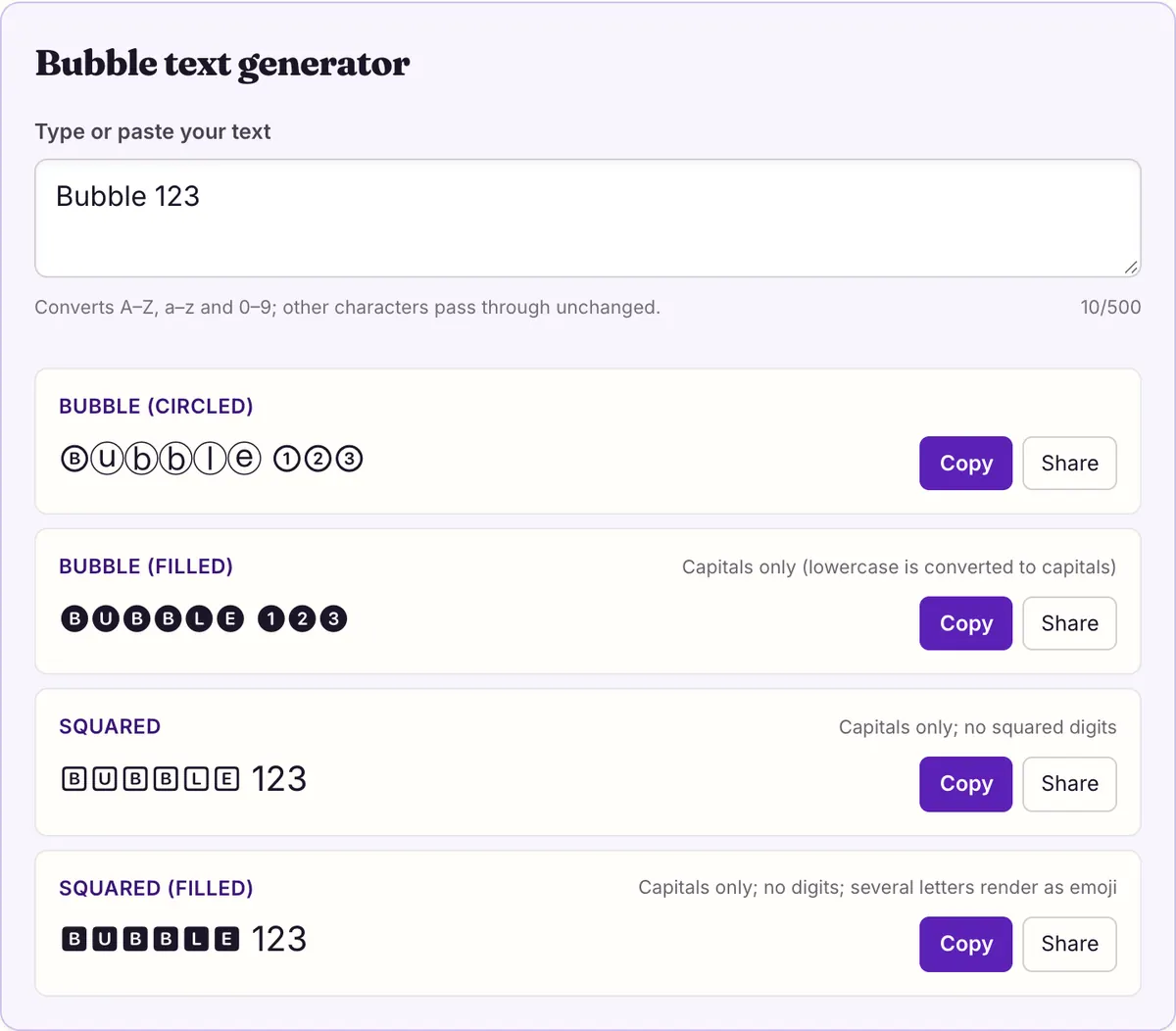
Four bubble styles compared
The four variants come from two Unicode blocks and one extra set of digits. Only the plain circled style has everything: capitals, lowercase and digits. The other three exist as capitals only, so the tool turns lowercase into capitals before converting, and the two squared styles have no digits at all, so numbers pass through unchanged.
Every example in the table was generated by the same engine as the tool, from the input "Bubble 123".
In practice the four look quite different. Circled letters are light and airy, with thin outlines that suit bios and soft headings. Filled circles are white letters on solid black discs and read as bold and graphic, like buttons or game labels. Squared letters look like keys on a keyboard or boxes on a form. Filled squares are the heaviest of all, white on black blocks, and are the variant most likely to be mixed with emoji, for reasons covered below.
Because three variants are capitals only, a sentence in those styles always reads as shouting. That is fine for a single word or a short name, but long phrases become tiring. If you want a full sentence in bubbles, the plain circled style with lowercase is the easiest on the eyes.
| Variant | "Bubble 123" becomes | Letters | Digits | Letters that are also emoji |
|---|---|---|---|---|
| Circled | Ⓑⓤⓑⓑⓛⓔ ①②③ | Capitals U+24B6–24CF, lowercase U+24D0–24E9 | ① to ⑨ (U+2460–2468) and ⓪ (U+24EA) | Ⓜ |
| Filled circles | 🅑🅤🅑🅑🅛🅔 ❶❷❸ | Capitals only, U+1F150–1F169 | ❶ to ❾ from Dingbats (U+2776–277E) and ⓿ (U+24FF) | None |
| Squared | 🄱🅄🄱🄱🄻🄴 123 | Capitals only, U+1F130–1F149 | None, digits stay plain | None |
| Filled squares | 🅱🆄🅱🅱🅻🅴 123 | Capitals only, U+1F170–1F189 | None, digits stay plain | 🅰 🅱 🅾 🅿 |
Every circled letter and digit
The circled style is the most complete and the one most people mean by bubble text, so here is its full map. Each cell shows a plain character and the circled character it becomes. All 62 convert: 26 capitals, 26 lowercase and 10 digits.
Capital and lowercase circled letters look quite different in most fonts. Capitals fill more of the circle and read better at small sizes, so if a name or heading looks cramped in lowercase, type it in capitals before copying.
Digits work the same way, but note the zero: ⓪ is not in the run with ① to ⑨. It sits at U+24EA, further along the Enclosed Alphanumerics block, which is why a careless converter can leave zero plain or produce the wrong character. This tool maps it correctly, so 2026 becomes ②⓪②⑥.
Punctuation, spaces and accented letters have no circled forms in this tool, so they pass through as typed. A name like Zoë comes out as Ⓩⓞë, with a plain ë at the end; type it without the accent if you want every letter enclosed.
The emoji surprise: Ⓜ 🅰 🅱 🅾 🅿
A few enclosed letters lead a double life. Besides being ordinary text characters, some of them are also on Unicode's emoji list, which means an emoji font is allowed to draw them in color. The circled capital M and four of the filled-square capitals are in that group.
We checked what that means on real systems. On 2026-10-27 we read the character maps of the color emoji fonts on macOS 26.5.1 (Apple Color Emoji) and Android (Noto Color Emoji). Five bubble characters are in both, so these devices can draw them as color emoji instead of flat letters:
Nothing about the character changes. Ⓜ is still U+24C2 whether it is drawn flat or in color, so copying it out of a post and pasting it elsewhere gives the same code point; the receiving app decides again how to draw it.
| Character | Code point | Unicode name | Bubble variant | Apple emoji font | Android emoji font |
|---|---|---|---|---|---|
| Ⓜ | U+24C2 | CIRCLED LATIN CAPITAL LETTER M | Circled | Yes | Yes |
| 🅰 | U+1F170 | NEGATIVE SQUARED LATIN CAPITAL LETTER A | Filled squares | Yes | Yes |
| 🅱 | U+1F171 | NEGATIVE SQUARED LATIN CAPITAL LETTER B | Filled squares | Yes | Yes |
| 🅾 | U+1F17E | NEGATIVE SQUARED LATIN CAPITAL LETTER O | Filled squares | Yes | Yes |
| 🅿 | U+1F17F | NEGATIVE SQUARED LATIN CAPITAL LETTER P | Filled squares | Yes | Yes |
What the emoji letters do to your words
Mixed into a word, the emoji letters stand out. "MAP" in circled letters is ⓂⒶⓅ, and on a phone that draws Ⓜ as emoji, the M can appear as a colored badge next to two flat circled letters. In filled squares, "MAP" is 🅼🅰🅿, where the A and P can turn into red buttons and the M stays a flat black square. "Bob" becomes 🅱🅾🅱, which can be all emoji.
Whether a given app shows the emoji or the flat letter depends on the app and on how it chooses between text and emoji presentation, which we did not test app by app. What the measurement tells you is that the emoji drawing exists on these devices, so you should expect it.
If you want a uniform look, there are three ways around it:
Before you settle on a word, preview it where it will appear. The bubble text generator shows the characters in your browser's fonts, and on a Mac or phone you will usually already see the emoji versions in the tool itself. If the preview looks uneven, swap variants rather than letters: all four styles are one click apart in the list above, and the same word often looks balanced in one and patchy in another.
- Use the filled circles instead of filled squares. None of the filled circled letters were in the emoji fonts we measured.
- Use lowercase circled letters. Only the capital Ⓜ was in the emoji fonts; ⓜ was not.
- Lean into it. Words built from A, B, O and P in filled squares, such as 🅱🅾🅱, can look intentionally emoji-like.
Do bubble letters show up for everyone?
On the systems we measured, yes. We checked every character the four bubble styles can produce against the system fonts of macOS 26.5.1 and Android, and each one is drawn by at least one font on both. The table shows how many characters each style produces and how many were drawn: 62 for circled, 36 for filled circles (26 capitals and 10 digits), and 26 each for the two squared styles, which have capitals only.
Two limits. We did not measure Windows, because its fonts were not on the measuring machine, so we cannot say how bubble text looks there. And devices with older or smaller font sets were not part of the measurement, so a reader on one of those may see boxes for some characters. If someone tells you your name shows as boxes, the plain circled style comes from the main Enclosed Alphanumerics block rather than the Supplement, and is the first thing to try.
| Style | Sample | Converts | macOS 26.5.1 system fonts | Android fonts | What stays plain |
|---|---|---|---|---|---|
| Bubble (circled) | Ⓐⓑⓒ ①②③ | A–Z 26/26 · a–z 26/26 · 0–9 10/10 | 62/62 drawn | 62/62 drawn | Nothing — full set |
| Bubble (filled) | 🅐🅑🅒 ❶❷❸ | A–Z 26/26 · a–z 26/26 · 0–9 10/10 | 36/36 drawn | 36/36 drawn | Capitals only (lowercase is converted to capitals) |
| Squared | 🄰🄱🄲 123 | A–Z 26/26 · a–z 26/26 · 0–9 0/10 | 26/26 drawn | 26/26 drawn | Capitals only; no squared digits |
| Squared (filled) | 🅰🅱🅲 123 | A–Z 26/26 · a–z 26/26 · 0–9 0/10 | 26/26 drawn | 26/26 drawn | Capitals only; no digits; several letters render as emoji |
Bubble text in names, bios and posts
Bubble letters are one character per letter, so unlike glitch or strikethrough text they do not double the length of a name. That makes them a good fit for display names and short bio lines. Some platforms restrict which characters a name can use, though. Discord, for example, allows special characters in display names but limits usernames to a–z, 0–9, underscores and periods. Roblox filters all text and does not publish which characters pass, so test before you rely on it.
Readability is the other cost. Searching for a plain name will not find ⒷⓄⒷ, because the characters are different. And screen readers may read each one by its full name, such as CIRCLED LATIN CAPITAL LETTER B, or skip them, depending on the reader. W3C accessibility guidance asks that meaning not depend on how text looks, so use bubble text for decoration and keep anything people need to find or hear in plain letters.
A few practical picks: for a display name, circled capitals or filled circles keep the name short and readable; for a bio heading, one word in filled squares draws the eye without crowding the rest; for numbered steps in a post, the circled digits ① to ⑨ work well on their own, even in plain text. Keep bubble text to the part you want noticed and write the rest normally.
If you were looking for the drawn, inflated kind of bubble letters for a poster or a logo, that is a font or an image, not text you can paste. This bubble text generator covers the pasteable kind. For the drawn kind you would need a design tool and a bubble-style font file, and the result would be an image that cannot be pasted into a name or bio as text.
Questions people ask
- Why did my lowercase letters become capitals?
- Filled circles, squares and filled squares exist in Unicode as capitals only. The tool converts lowercase to capitals for those three styles. Only the plain circled style has true lowercase bubbles. If you need lowercase in a darker style, there is no filled lowercase bubble in Unicode, so mixing circled lowercase with filled capitals is the closest you can get.
- Why are my numbers not in bubbles?
- Unicode has no squared or filled-square digits, so numbers stay plain in those two styles. The circled style uses ① to ⑨ and ⓪, and the filled circles use ❶ to ❾ and ⓿. If you want digits in a squared design, combine styles by hand: copy the squared letters, then type or copy circled digits next to them.
- Why does the letter M or A look like an emoji?
- Ⓜ and the filled-square 🅰 🅱 🅾 🅿 are also emoji. We found them in Apple Color Emoji and Noto Color Emoji, so Apple devices and Android can draw them in color.
- Can I make bubble letters bigger?
- Not with text. Size is set by the app you paste into. Bubble text characters are ordinary text and appear at the same size as the letters around them. If you want bigger bubbles, use the heading or text-size option of the app you are posting in, where one exists, or make an image instead.
Sources & further reading
Read next
- Weird Text Generator
Weird text generator with nine styles: glitch, upside down, bubble, crossed out and wide letters, plus which Unicode characters each one is built from.
- Upside Down Text Generator
Upside down text generator that flips and reverses your text, plus a full lookup table of every turned character it uses and the letters Unicode can't flip.
- Copy and Paste Fonts
Copy and paste fonts in 27 Unicode styles: bold, cursive, Old English and more. See which letters each style lacks and which phones can draw them.
- Fancy Text Showing as Boxes
Fancy text showing as boxes? We checked 365 macOS fonts and Android's system fonts: common styles draw fine, but 24 reserved code points never do. Fixes inside.
Part of Weird Text Generator. Want every style at once? Use the fancy text generator on the home page.
Sukie · Editor
Sukie edits Fancy Text Styles. Every style on the site is checked against the Unicode Consortium code charts before it is published, and every page names the characters a style cannot produce instead of hiding them.
About this site · How pages are checked · Last updated October 27, 2026
Fancy Text Styles is an independent site. Discord, Instagram, TikTok, X and other platform names belong to their owners and are used only to describe where text is pasted; none of them endorse this site.