Cursive Font Generator: Script Letters You Can Paste Into a Bio or Name
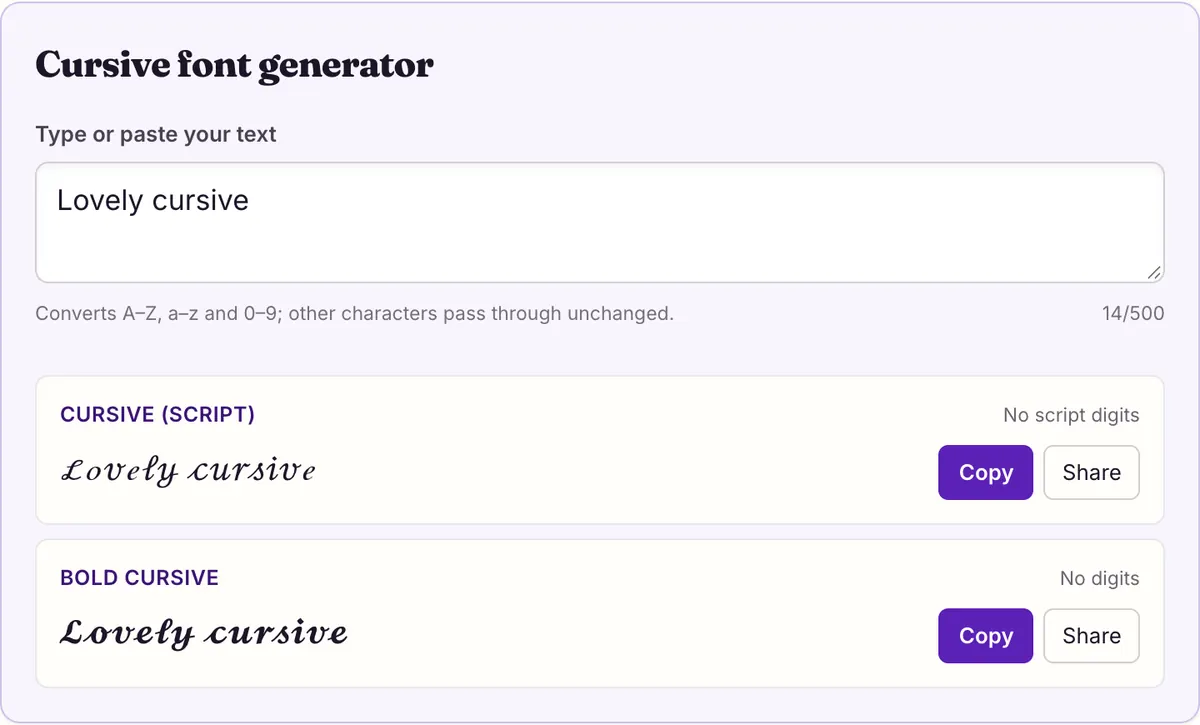
This cursive font generator turns typed text into Unicode script letters, 𝒸𝓊𝓇𝓈𝒾𝓋ℯ or 𝓬𝓾𝓻𝓼𝓲𝓿𝓮, that paste into bios, names and captions like normal text. Type below, copy the thin or bold script, and paste. Unicode has no script digits, so numbers stay plain, and 11 thin-script letters (such as ℬ and ℯ) come from the Letterlike Symbols block.
Cursive font generator
No script digits
No digits
You are writing a bio. The words are fine, but they look like everyone else's, and you want your name to look handwritten, the way it would on a card. The app has no font menu. So you search for a cursive font generator, paste the result, and it works: ℰ𝓂𝓂𝒶 ℛℴℊℯ𝓇𝓈 appears exactly as it did in the tool.
What happened is not a font change. Each letter was replaced with a different Unicode character from the Mathematical Alphanumeric Symbols block, and the app drew those characters with whatever fonts the phone has. Knowing that explains everything else on this page: why some letters look slightly different, why your birth year stayed plain, and why a friend's phone might show it differently.
Thin script vs bold script
Unicode has two cursive alphabets, and the generator above gives you both. Thin script (Unicode calls it MATHEMATICAL SCRIPT) has fine hairline strokes and generous loops. Bold script (MATHEMATICAL BOLD SCRIPT) has the same shapes drawn with heavier strokes.
Here is one name in each: thin script gives ℰ𝓂𝓂𝒶 ℛℴℊℯ𝓇𝓈, bold script gives 𝓔𝓶𝓶𝓪 𝓡𝓸𝓰𝓮𝓻𝓼. Thin script looks more elegant at large sizes. Bold script holds up better where text is small, such as a comment thread or a list of names, because hairlines can disappear on a small, low-contrast screen.
There is a structural difference too. Bold script is one unbroken run of 52 letters. Thin script borrows 11 of its letters from an older Unicode block, which is why some capitals in ℰ𝓂𝓂𝒶 ℛℴℊℯ𝓇𝓈 may look a little different from their neighbors on some systems. If perfectly even letterforms matter to you, bold script is the safer pick.
Capitals deserve a look before you choose. Script capitals are large and ornate, and in thin script several of them (ℬ ℰ ℱ ℋ ℐ ℒ ℳ ℛ) are the borrowed ones. A name with two capitals from that list, such as ℳ𝒶𝓇𝓎 ℒℯℯ, leans heavily on Letterlike characters; the same name in bold script, 𝓜𝓪𝓻𝔂 𝓛𝓮𝓮, is drawn entirely from the math block.
Make cursive text in four steps
The process is the same on a phone and a computer. The only difference is how you paste.
If the field rejects the paste, or the saved result looks plain, the field is stricter than the preview suggested. Try the same text in a different field of the same app, such as the display name rather than the username, before concluding that cursive does not work there.
- Type your text in the box at the top of this page. Names and short phrases work best; whole paragraphs in script are hard to read.
- Compare the thin and bold script previews. If your text includes numbers, notice that they stay plain in both.
- Tap or click the copy button next to the style you want. The text is now on your clipboard as ordinary Unicode characters.
- Open the app, place the cursor in the field and paste: long-press and choose Paste on a phone, or Ctrl+V (⌘V on a Mac) on a computer. Check the preview before saving.
Eleven script letters come from an older block
Before Unicode added full mathematical alphabets, it had already encoded a few script letters in the Letterlike Symbols block (U+2100–214F), such as ℬ (SCRIPT CAPITAL B, U+212C) and ℯ (SCRIPT SMALL E, U+212F). When the script alphabet arrived in the math block, Unicode left those 11 positions reserved and pointed to the existing characters instead.
The table lists all 11. The middle column is the reserved code point a careless generator would output; on 2026-10-27 we checked each against every system font on macOS 26.5.1 and Android, and none of the fonts draws any of them. The right-hand column is what our engine actually outputs. The practical upshot: if a cursive name shows boxes in place of B, E, H, M or lowercase e, g, o everywhere, the text came from a tool that used the empty slots.
"Hello, Bella" is a good test phrase because it hits three of them: ℋℯ𝓁𝓁ℴ, ℬℯ𝓁𝓁𝒶. Every highlighted letter there is from Letterlike Symbols. Bold script has none of these holes; its 52 letters are all in the math block.
| Letter | Empty slot a naive generator uses | Drawn there? | Correct character |
|---|---|---|---|
| B | U+1D49D (reserved, unassigned) | No — box on macOS and Android | ℬ U+212C |
| E | U+1D4A0 (reserved, unassigned) | No — box on macOS and Android | ℰ U+2130 |
| F | U+1D4A1 (reserved, unassigned) | No — box on macOS and Android | ℱ U+2131 |
| H | U+1D4A3 (reserved, unassigned) | No — box on macOS and Android | ℋ U+210B |
| I | U+1D4A4 (reserved, unassigned) | No — box on macOS and Android | ℐ U+2110 |
| L | U+1D4A7 (reserved, unassigned) | No — box on macOS and Android | ℒ U+2112 |
| M | U+1D4A8 (reserved, unassigned) | No — box on macOS and Android | ℳ U+2133 |
| R | U+1D4AD (reserved, unassigned) | No — box on macOS and Android | ℛ U+211B |
| e | U+1D4BA (reserved, unassigned) | No — box on macOS and Android | ℯ U+212F |
| g | U+1D4BC (reserved, unassigned) | No — box on macOS and Android | ℊ U+210A |
| o | U+1D4C4 (reserved, unassigned) | No — box on macOS and Android | ℴ U+2134 |
Every script character on one grid
The grid maps all 62 plain characters to thin script. Highlighted cells are the 11 Letterlike substitutions from the previous section. Dashed cells are the ten digits, which have no script form in Unicode at all, so the plain digit is kept.
Punctuation, spaces and emoji pass through unchanged, so "Lovely cursive!" becomes ℒℴ𝓋ℯ𝓁𝓎 𝒸𝓊𝓇𝓈𝒾𝓋ℯ! with an ordinary exclamation mark. Accented letters such as é or ñ also stay plain, because the math alphabets cover only the 26 basic Latin letters in each case.
Uppercase input is worth a second look in the grid. Script capitals are much wider than lowercase script letters, so an all-caps word such as a team name gets long fast. Mixed case usually reads better: a capital at the start of each word, lowercase script for the rest, exactly as you would write it by hand.
Measured: which systems can draw script?
Whether your cursive shows up on someone else's screen depends on their fonts, not yours. We read the character map of all 365 system font files on macOS 26.5.1 and the Android system fonts listed in the Android Open Source Project's font configuration, and counted how many of each style's characters at least one font can draw.
Both script styles came out complete: all 52 letters are drawable on both systems. The table also confirms the digit gap and links each style to its Unicode source. We did not measure Windows, so it is absent from the table, and an app with its own font stack could still draw characters differently from the system.
| Style | Sample | Converts | macOS 26.5.1 system fonts | Android fonts | What stays plain |
|---|---|---|---|---|---|
| Cursive (script) | 𝒜𝒷𝒸 123 | A–Z 26/26 · a–z 26/26 · 0–9 0/10 | 52/52 drawn | 52/52 drawn | No script digits |
| Bold cursive | 𝓐𝓫𝓬 123 | A–Z 26/26 · a–z 26/26 · 0–9 0/10 | 52/52 drawn | 52/52 drawn | No digits |
Why your numbers stay plain
Type "Born in 1999" and you get ℬℴ𝓇𝓃 𝒾𝓃 1999 in thin script and 𝓑𝓸𝓻𝓷 𝓲𝓷 1999 in bold. The digits are not a bug in the tool. The Mathematical Alphanumeric Symbols block encodes digits only for bold, double-struck, sans-serif, sans-serif bold and monospace, so there is no cursive 1 or 9 for any generator to output.
You have three workable options. Leave the numbers plain, which usually looks fine because script and upright digits are visually distinct anyway. Spell the number out, so "twenty-four" converts completely. Or deliberately mix: bold digits such as 𝟏𝟗𝟗𝟗 next to bold script letters read as intentional. Avoid mixing several decorative digit styles in one short line; it starts to look like a ransom note.
Dates have the same problem in a different form. "Est. 2019" in thin script becomes ℰ𝓈𝓉. 2019, and "June 24" becomes 𝒥𝓊𝓃ℯ 24. Both are perfectly readable. The plain digits are only a problem if you expected the whole line to look handwritten, and then spelling out is the cleanest fix.
Places pasted cursive tends to break
Most failures happen at the field, not at the generator. The receiving app decides what characters it accepts, how it stores them and which fonts draw them. Here are the patterns to expect, with what is documented and what is not.
None of these is solved by trying another cursive generator. Every tool outputs the same Unicode characters, so the app treats them the same way; what you can change is which field you use and how much text you style.
- Usernames and handles: these often accept only a short character list. Discord's help center, for example, limits usernames to a–z, 0–9, underscore and period, while saying display names may include special characters.
- Game name filters: Roblox says all text is filtered and blocked text shows as ####, but it publishes no list of allowed characters, so nobody can promise which Unicode passes.
- Search: script letters are different characters from plain ones. Each has a compatibility mapping back to its plain letter, so apps that normalize text can match it and apps that do not will miss it.
- Silent normalization: some fields convert pasted text back to plain letters on save, for the same reason. If your preview showed cursive but the saved version does not, that is the likely cause.
- A friend sees boxes: their device lacks a font with these characters. Ask what system and app they use; we measured macOS and Android as complete, and Windows was not measured.
Cursive and screen readers
Each script letter has a formal name, such as MATHEMATICAL SCRIPT SMALL A. Screen readers handle these differently: some announce the full name for every letter, some read the plain letter, and some skip the character. We have not tested specific screen readers and will not claim how any particular one behaves.
The W3C's accessibility guidance says information should not depend on visual presentation alone. For a cursive name this is easy to respect: keep your plain username or handle visible somewhere, keep the styled part short, and never put essential information, such as a contact address, only in script.
Is this the same as a cursive font file?
No, and the difference decides which one you need. A downloadable cursive font, the kind font libraries list by the thousand, is a file you install so that programs with a font menu, such as a word processor or design app, can draw ordinary letters in that style. It only affects documents you create on that computer, and the people you send them to need the font too, or an exported image or PDF.
Unicode script needs nothing installed. It works in places that have no font menu, such as profile fields, captions and chat, because the characters themselves carry the style. The trade-off is that you get exactly one script design per weight, drawn by the reader's system fonts, rather than your choice of thousands of handwriting styles.
There is one more practical difference. A real font changes every character you type in that program, including digits, punctuation and accented letters, because it contains drawings for all of them. Unicode script only covers the 52 basic Latin letters, so anything else in your text stays in the app's normal font. For a name that is rarely noticeable; for a full sentence with numbers and punctuation it is.
So: designing an invitation or a poster, use a real font. Styling a name or a line of text inside an app, use the generator.
Keep it short and readable
Script is most effective in small doses. A name, a two-word tagline or a single word of emphasis catches the eye; a full bio in script is tiring to read, especially in thin script on a small screen.
A pattern that works well is one styled element per profile: a cursive display name with a plain-text bio, or a plain name with one script line. And if you are torn between the two weights, look at both on your phone at the size they will actually appear. The one you can still read at a glance is the one to use.
Finally, think about where the name will be read. A display name appears in many places at once: next to posts, in member lists, in notifications, sometimes in a narrow column. Script that looks lovely on your profile page can be cramped in a notification. Checking it in two or three of those spots before you commit takes a minute and saves a second round of edits.
Questions people ask
- Why do some cursive letters look different from the rest?
- Eleven thin-script letters (ℬ ℰ ℱ ℋ ℐ ℒ ℳ ℛ ℯ ℊ ℴ) come from the Letterlike Symbols block, and some systems draw them with a different font from the surrounding letters. Bold script has no borrowed letters, so its letters always come from a single run.
- Why are there no cursive numbers?
- Unicode has no script digits. Only bold, double-struck, sans-serif, sans-serif bold and monospace have digits in the math block.
- Can I use cursive in my Instagram bio?
- There is no documented font setting for Instagram bios, so pasted Unicode characters are how people do it. We have not tested Instagram; paste into the field and check the preview before saving.
- Why does my cursive show boxes on someone else's phone?
- Either their device lacks fonts for these characters, or the text came from a generator that used Unicode's reserved slots, which no font draws. If the boxes are always the same few letters, such as B, H or e, the reserved slots are the cause.
- Can I use cursive in a Discord username?
- No. Discord usernames accept only a–z, 0–9, underscore and period. Use it in your display name, which Discord says may include special characters.
- Is bold script the same as bold cursive?
- Yes. Unicode calls it MATHEMATICAL BOLD SCRIPT; generators usually label it bold cursive. It has no borrowed letters and no digits.
- Do accented letters work in cursive?
- No. The math alphabets cover only A–Z and a–z, so é, ü, ñ and similar letters stay plain.
- Does cursive text work on Windows?
- We did not measure Windows, so we cannot say. Our measured results cover macOS 26.5.1 and Android system fonts, where both script styles are complete.
- Is italic the same as cursive?
- No. Italic is slanted print; script imitates joined handwriting. See the italic generator for the slanted styles.
Sources & further reading
Read next
- Bold Text Generator
Bold text generator with six Unicode bold styles, serif to fraktur. See which ones have bold digits, every character mapped, and measured phone coverage.
- Old English Font Generator
Old English font generator for blackletter-style text: regular and bold fraktur, the five capitals Unicode borrows from an older block, and every letter mapped.
- Instagram Fonts
Instagram fonts for your bio, name, captions and comments: eight Unicode styles to copy, how pasting works, and what followers' phones can actually draw.
- Fancy Text Showing as Boxes
Fancy text showing as boxes? We checked 365 macOS fonts and Android's system fonts: common styles draw fine, but 24 reserved code points never do. Fixes inside.
- Italic Font Generator
Italic font generator for bios, comments and names: four Unicode italic styles, the correct italic h (U+210E), and why italic numbers don't exist.
Part of Copy and Paste Fonts. Want every style at once? Use the fancy text generator on the home page.

Sukie · Editor
Sukie edits Fancy Text Styles. Every style on the site is checked against the Unicode Consortium code charts before it is published, and every page names the characters a style cannot produce instead of hiding them.
About this site · How pages are checked · Last updated October 27, 2026
Fancy Text Styles is an independent site. Discord, Instagram, TikTok, X and other platform names belong to their owners and are used only to describe where text is pasted; none of them endorse this site.